
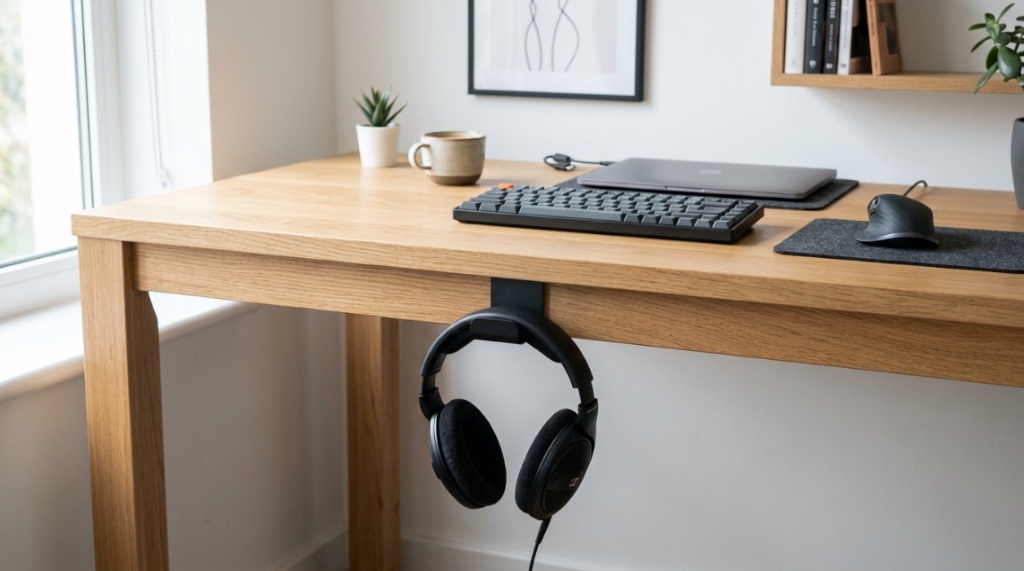
An affordable desk headset holder balances low cost with reliable construction and practical design. You don’t need to spend more than $15 to $40 to get a holder that keeps your headset accessible, protects the headband padding, and frees up desk space. The trick is knowing which features matter most and where you can safely cut corners.
Material Quality Versus Price
Most budget-friendly holders use ABS plastic, aluminum alloy, or a combination of both. Plastic models can be surprisingly durable if they use thick-walled construction rather than thin, brittle materials. Aluminum holders often cost a few dollars more but resist cracking and look better on your desk. Avoid holders that feel flimsy in your hand — that usually indicates poor long-term value.
Weight Capacity and Stability
A cheap holder that tips over every time you grab your headset is no bargain. Look for models with a weighted base, adhesive pad, or clamp mechanism that provides solid grip. Affordable options with a wide rubberized base offer the best stability for under $20. For heavier gaming headsets over one pound, choose a clamp-on or under-desk model rather than a freestanding one.
Design Simplicity Reduces Cost
The most affordable desk headset holders are simple hooks or pegs without extra features like cable management or RGB lighting. That minimal design keeps manufacturing costs low, and you benefit from a clean, functional product. If you only need to hang a headset, a basic hook-shaped holder works perfectly and costs as little as $8.
What Types of Affordable Desk Headset Holders Exist?
There are four main types of affordable desk headset holders: under-desk mounts, clamp-on arms, freestanding bases, and adhesive hooks. Each type solves a different desk layout problem. Understanding which style fits your workspace will save you from buying a holder that doesn’t work in your setup.
Under-Desk Mounts
These attach to the underside of your desk using screws or heavy-duty adhesive. They keep the headset completely out of sight, freeing up valuable surface area. Under-desk mounts are ideal for small desks or minimalist setups. Most cost between $10 and $25. The main trade-off is that you need enough clearance between the desk bottom and your legs or drawers.
Clamp-On Arms
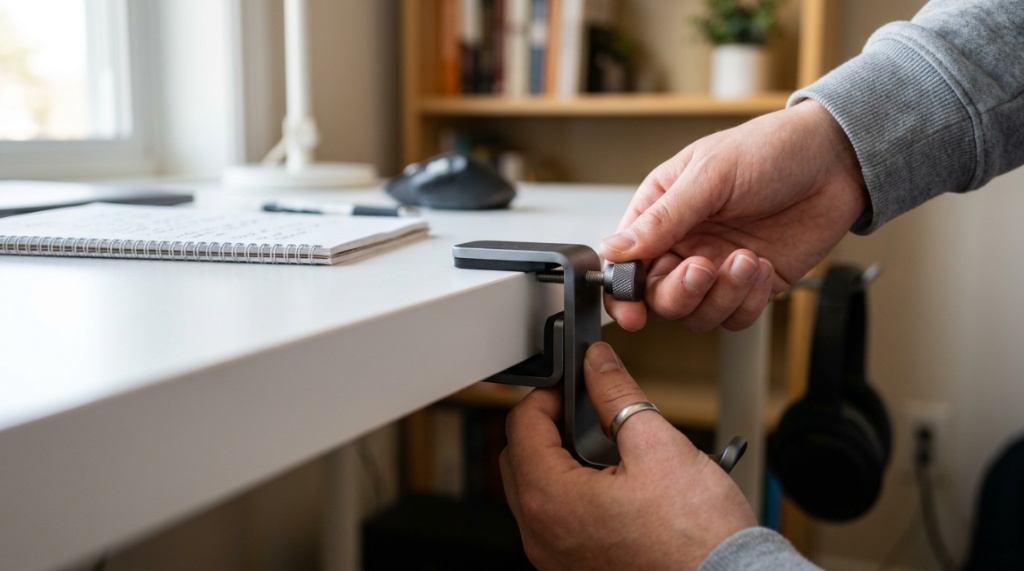
These holders use a C-clamp to grip the edge of your desk. They extend upward and forward, placing your headset within easy reach without taking up desk space. Clamp-on models are excellent for thicker desks where adhesive mounts might fail. They range from $12 to $30 and work best with desks that have a straight, accessible edge.
Freestanding Bases
These sit on top of your desk with a weighted or rubberized base. They are the easiest to install — just place them where you want. Freestanding holders are also portable, so you can move them between workstations. Prices range from $8 to $35. The downside is that they use a small amount of desk surface area, which matters if your desk is already crowded.
Adhesive Hooks
Simple stick-on hooks are the cheapest option, often under $10. They attach to the side or front of your desk. Adhesive hooks work well for lightweight headsets under 10 ounces. For heavier headsets, the adhesive can weaken over time, especially in warm or humid environments. They are best as a temporary or secondary solution.
Which Features Actually Matter for Budget Buyers?
When you are shopping for affordable desk headset holders, focus on three core features: compatibility with your headset size, mounting method suitability, and cable management capability. Ignoring these factors leads to a holder that doesn’t fit your gear or your workspace.
Headset Width and Band Thickness
Most holders accommodate headsets with a single band up to two inches wide. But over-ear gaming headsets with thick padded headbands can measure two and a half inches or more. Before buying, measure the width of your headset band at its middle point. Also check the thickness — some holders have narrow hooks that pinch thicker bands, damaging foam over time.
Mounting Surface and Clearance
For under-desk mounts, measure the gap between your desk bottom and your thigh clearance. You need at least three inches of vertical space for most headsets to hang freely. For clamp-on models, ensure your desk edge is at least half an inch thick and not angled or beveled. Adhesive mounts require a clean, dry, and smooth surface for proper bonding.
Integrated Cable Management
Even budget holders sometimes include a small clip or channel for your headset cable. This feature prevents the cable from dangling and catching on your mouse or keyboard. If you use a wireless headset, cable management is irrelevant, and you can focus on the simplest and cheapest holder. For wired headsets, a built-in cable guide is worth an extra few dollars.
How Do You Install an Affordable Desk Headset Holder Properly?
Installation varies by holder type, but the general process takes between one and five minutes. Improper installation causes holders to fail prematurely. Follow the correct method for your specific style to ensure it stays secure.
Installing an Adhesive Under-Desk Mount
Clean the underside of your desk with rubbing alcohol to remove dust and oils. Let it dry completely for ten seconds. Peel the adhesive backing and press firmly for thirty seconds. Wait twenty-four hours before hanging any headset to allow the bond to fully cure. Avoid mounting on textured or painted surfaces.
Installing a Clamp-On Arm
Open the C-clamp fully and slide it onto the desk edge. Tighten the screw or lever until the clamp feels snug against both sides of the desk. Do not overtighten — that can damage the desk surface. Test stability by gently pulling on the arm. If it shifts, tighten slightly more. Place the arm so that the headset hook clears any monitors or shelves, Looking to complete your audio setup? Make sure you check our guide on why you should avoid buying low-quality over ear headphones online before pairing them with your new desk stand.
Installing a Freestanding Base
Remove any protective film from the rubber base pads. Place the holder on your desk exactly where you want it. Press down firmly to help the rubber grip the surface. Test by hanging your headset — the base should not lift or slide when you remove the headset. If it does, reposition to a flatter area or add a small non-slip pad underneath.
Where Should You Place a Desk Headset Holder for Best Ergonomics?
Place your headset holder within natural arm’s reach from your primary seated position. That location reduces strain from reaching and keeps your workflow smooth. Poor placement leads to tangled cables, bumped water glasses, and unnecessary motion during calls or gaming sessions.
Ideal Placement on a Standard Desk
Mount the holder on the side of your non-dominant hand. If you are right-handed, place the holder to your left. This keeps the headset out of your mouse hand’s way while still being easy to grab. Keep the holder at least six inches away from your monitor to avoid blocking the screen when the headset is hanging.
Placement for Shared Desks or Hot Desks
If you share a workspace, choose a clamp-on or freestanding holder that you can remove easily at the end of your shift. Adhesive mounts are harder to relocate and may leave residue. A freestanding holder that you take with you in a bag offers the most flexibility for hot-desking environments.
Can You Use a Headset Holder for Multiple Headsets?
Some affordable desk headset holders can accommodate two headsets, but you need to check the hook design and weight limit. Single-hook holders are designed for one headset. Dual-hook models or multi-arm holders support two or more headsets, making them useful for shared family computers or dual-workstation setups.
Dual Headset Holders Under $30
Several budget models feature two separate hooks spaced apart to prevent headsets from touching each other. These models typically cost between $18 and $30. They work best when both headsets are similar in weight. If you hang an ultralight headset next to a heavy one, the base can tip under uneven load. Look for models with a wide, weighted base for stability.
DIY Solutions for Multiple Headsets
If you need to hold three or more headsets on a budget, consider using two separate single-headset holders placed a few inches apart. This gives you flexibility to position each headset exactly where you want. Total cost for two budget holders is often under $25, which is cheaper than purpose-built multi-headset stands that cost $40 and up.
What Are the Best Affordable Desk Headset Holder Materials?
The three most common materials are ABS plastic, aluminum alloy, and silicone. Each offers different benefits at different price points. Your choice depends on how much weight you need to support and what style fits your desk aesthetic.
ABS Plastic Holders
ABS plastic is lightweight, corrosion-resistant, and the most affordable option. High-quality ABS holders use thick walls and reinforced stress points to prevent cracking. These holders cost between $8 and $15. Avoid holders made from recycled or thin plastic, which become brittle within months. Look for the word “reinforced” or “heavy-duty” in the product description.
Aluminum Alloy Holders
Aluminum alloy holders cost slightly more, typically $15 to $30, but they offer superior strength and a premium look. They can support heavier headsets without bending. Aluminum also dissipates heat better, which helps if your headset gets warm during long use. Some aluminum holders come with a matte or anodized finish that resists fingerprints and scratches.
Silicone or Rubber-Coated Holders
Some affordable holders use a silicone coating over a metal or plastic core. The silicone provides extra grip and prevents scratches on your headset band. These holders are excellent if you have an expensive headset and want to protect the padding. They typically cost between $12 and $20.
How Long Do Affordable Desk Headset Holders Last?
With proper use and installation, a budget headset holder should last between one and three years. Plastic holders in low-moisture environments often last the full three years. Adhesive mounts near windows or heaters may fail sooner due to temperature fluctuations and UV exposure.
Signs Your Holder Needs Replacement
Watch for visible cracks in plastic holders, especially near the hook’s bend point. Check adhesive mounts monthly by gently tugging — if they move at all, replace the adhesive pad or the entire holder. For clamp-on holders, listen for squeaking sounds, which indicate the screw is loosening or the clamp is fatiguing.
Extending the Life of Your Holder
Avoid hanging your headset by the ear cups rather than the headband, which puts uneven stress on the hook. Keep the holder away from direct sunlight and heat vents. Clean the holder monthly with a damp cloth to remove dust that can degrade adhesives and finishes.
If you are looking for a reliable and affordable desk headset holders that balances price with durability, the curated list in that resource narrows down the best options for different desk types and headset weights.
Why Should You Avoid Ultra-Cheap Headset Holders?
Holders under $5 often use brittle plastic, weak adhesives, and undersized hooks that damage your headset. The savings are not worth the risk of a dropped headset or a broken holder that needs replacement within weeks. Spend a few extra dollars to get a product that protects your investment.
Common Failures in Ultra-Cheap Models
Adhesive pads on $3 holders lose grip after a single week in normal office temperatures. The plastic hooks develop stress cracks at the thin attachment point, and the entire headset can crash onto your desk. Some cheap freestanding holders use a hollow base filled with sand — if the base cracks, sand spills everywhere and the holder becomes useless.
The Real Cost of Buying Cheap
A $3 holder that breaks and drops your $100 headset costs you far more than a $15 holder that lasts three years. The math is simple: spend a reasonable amount upfront to protect your gear. The sweet spot for affordability is between $10 and $25, where you get reliable materials without paying for luxury branding or unnecessary features.
Frequently Asked Questions
Can I use a headset holder with a wireless charging headset?
Yes, but choose a holder that leaves the charging contacts or induction coil area unobstructed. Freestanding and clamp-on holders work best because they do not cover the bottom or side of the headset where charging components usually sit.
Are adhesive headset holders safe for all desk surfaces?
Adhesive holders are safe for solid wood, metal, and plastic desktops. Avoid using them on laminates, painted surfaces, or particleboard, as the adhesive can peel the finish or surface layer when removed. Test a small area first if you are unsure.
How do I remove a stuck adhesive headset holder?
Apply heat from a hairdryer on medium setting to the adhesive pad for about thirty seconds. Gently slide dental floss or a thin plastic spudger between the pad and the desk. Work slowly to avoid damaging the desk surface. Remove leftover residue with rubbing alcohol or citrus-based cleaner.
Do headset holders work with gaming headsets with thick ear cups?
Most holders accommodate standard over-ear headsets. However, some gaming headsets with extremely thick or angled ear cups may not fit into the hook gap. Measure the width between the ear cups when the headset is folded or resting naturally. If it exceeds four inches, look for a holder with a wider hook opening.
Can I mount a headset holder vertically instead of horizontally?
Yes, some clamp-on and under-desk mounts allow rotation. Vertical mounting saves even more space, especially along the side of a monitor stand. Ensure the headset hangs straight without twisting the cable. Not all budget holders support rotation — check the product listing before buying.
What is the best holder for a heavy studio headset?
For headsets over 1.5 pounds, choose a clamp-on or under-desk mount made from aluminum alloy. Avoid freestanding plastic bases, which can tip. A weighted base still works if the headset is under two pounds, but clamp-on designs distribute the weight more securely to the desk structure.
Are universal headset holders compatible with all brands?
Most universal holders work with any headset that has a standard headband design. Exceptions include very thin on-ear headsets that may slip through wide hooks, and bone conduction headsets with unusual rear bands. Check product photos or user reviews that show your specific headset model to confirm fit.
Conclusion
Choosing the right affordable desk headset holder comes down to matching the design to your desk setup, headset weight, and personal ergonomics. Under-desk mounts save surface space, clamp-on arms offer stability on thick desks, and freestanding bases provide portability. Adhesive hooks work for lightweight headsets on a tight budget, but for most people, spending between $10 and $25 delivers the best combination of durability, stability, and value. Measure your headset band, check your desk edge thickness, and pick a holder that matches those specifications. Your desk stays cleaner, your headset stays protected, and you never have to dig a tangled cable out from behind your monitor again.